AutoPosSizeAndSLTP
Position Sizing + Order Entry + Risk Management. One Study.
Stop guessing position sizes. Stop calculating tick distances for your stops. Stop manually moving stops to breakeven.
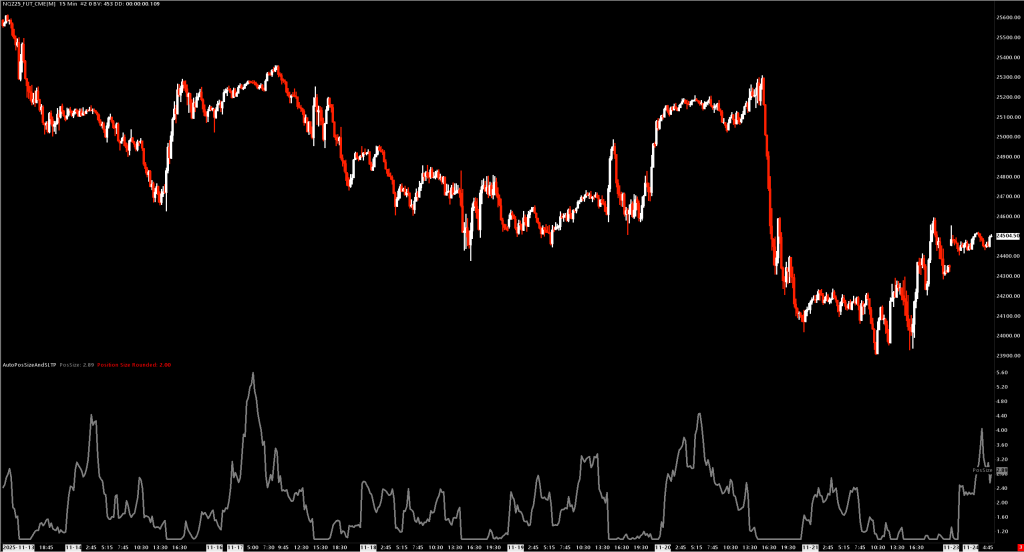
AutoPosSizeAndSLTP handles it all:
VOLATILITY-BASED POSITION SIZING
- Automatically calculates position size based on ATR
- High volatility = smaller size, Low volatility = larger size
- Volume-weighted ATR option for more responsive sizing
- Respects your min/max position limits
DOLLAR-BASED RISK MANAGEMENT
- Set stop loss in dollars, not ticks ($50 max loss)
- Set profit target in dollars ($100 target)
- Study calculates exact tick distances automatically
- Risk stays consistent regardless of volatility
ONE-KEY ORDER ENTRY
- Customizable keyboard shortcuts (B=Buy, S=Sell, etc.)
- Market and limit orders with automatic brackets
- Scale-in and scale-out support built-in
- Cancel opening orders while preserving stops/targets
AUTOMATIC BREAKEVEN
- Stop moves to breakeven when target % reached
- Configurable trigger percentage and offset
- “Move Target to Breakeven” for quick profit lock
PERFECT FOR:
- Discretionary traders who want consistent position sizing
- Scalpers who need fast keyboard-driven execution
- Risk-focused traders managing dollar-based stops
- Anyone tired of calculating position sizes manually
One study. Complete execution system.
Documentation
Automatic position sizing with integrated order entry, stop-loss, profit targets, and breakeven management.
Overview
AutoPosSizeAndSLTP calculates optimal position size based on market volatility (ATR) and provides one-click/one-key order entry with automatic bracket orders. Think of it as a complete trading execution system that:
- Sizes positions based on current volatility
- Sets stops and targets in dollar amounts (not ticks)
- Manages risk with automatic breakeven moves
- Executes trades via menu or keyboard shortcuts
Key Features
Volatility-Based Position Sizing
- Uses Average True Range (standard or volume-weighted)
- Higher volatility = smaller position size
- Lower volatility = larger position size
- Respects min/max position limits
Dollar-Based Risk Management
- Set stop loss as a dollar amount (e.g., $50 max loss)
- Set profit target as a dollar amount (e.g., $100 target)
- Study automatically calculates tick distances based on position size
Integrated Order Entry
- Market orders (Buy/Sell)
- Limit orders at pointer price
- All orders include automatic stop and target brackets
- Scale-in and scale-out support
Breakeven Management
- Automatic stop move to breakeven when target % reached
- Configurable breakeven trigger percentage
- Offset to cover fees/commissions
Inputs
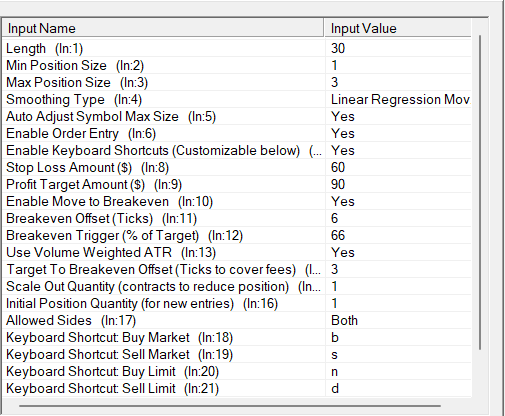
Position Sizing
| Input | Default | Description |
|---|---|---|
| Length | 60 | ATR lookback period |
| Min Position Size | 1 | Minimum contracts |
| Max Position Size | 3 | Maximum contracts |
| Smoothing Type | Wilder’s | Moving average type for ATR |
| Use Volume Weighted ATR | Yes | Weight ATR by volume for more responsive sizing |
| Auto Adjust Symbol Max Size | Yes | Automatically update Sierra Chart’s symbol max position |
Risk Management
| Input | Default | Description |
|---|---|---|
| Stop Loss Amount ($) | $50 | Maximum dollar loss per trade |
| Profit Target Amount ($) | $100 | Target dollar profit per trade |
| Enable Move to Breakeven | Yes | Auto-move stop to breakeven |
| Breakeven Trigger (% of Target) | 50% | Move stop when this % of target reached |
| Breakeven Offset (Ticks) | 6 | Ticks beyond entry for breakeven stop |
| Target To Breakeven Offset (Ticks) | 3 | Offset for “Move Target to Breakeven” function |
Order Entry
| Input | Default | Description |
|---|---|---|
| Enable Order Entry | Yes | Enable menu and keyboard order entry |
| Enable Keyboard Shortcuts | Yes | Enable hotkey trading |
| Initial Position Quantity | 1 | Contracts for new position entries |
| Scale Out Quantity | 1 | Contracts to reduce when scaling out |
| Allowed Sides | Both | Restrict to Long Only, Short Only, or Both |
Keyboard Shortcuts (Customizable)
| Action | Default Key |
|---|---|
| Buy Market | B |
| Sell Market | S |
| Buy Limit | N |
| Sell Limit | D |
| Cancel Opening Orders | C |
| Move Target to Breakeven | T |
How Position Sizing Works
The formula: Position Size = Max Size / (ATR / 10)
Example:
- Max Position Size: 3 contracts
- Current ATR: 15 ticks
- Calculation: 3 / (15/10) = 3 / 1.5 = 2 contracts
When volatility is high (large ATR), position size decreases. When volatility is low (small ATR), position size increases up to the maximum.
Order Types
New Position
- Uses Initial Position Quantity
- Attaches stop and target based on dollar amounts
- Enables breakeven management if configured
Scale-In (Adding to winning position)
- Checks remaining capacity vs max position
- Uses Initial Position Quantity (or remaining capacity if smaller)
- Attaches new brackets
Scale-Out (Reducing position)
- Uses Scale Out Quantity
- Reduces position without affecting existing stops/targets
Menu Commands
Right-click chart to access:
- Buy Market (Calc Size) – Market buy with calculated sizing
- Sell Market (Calc Size) – Market sell with calculated sizing
- Buy Limit at Pointer (Calc Size) – Limit buy at crosshair price
- Sell Limit at Pointer (Calc Size) – Limit sell at crosshair price
- Move Target to Breakeven – Move profit target to entry + offset
- Cancel Opening Orders – Cancel limit entries, keep stops/targets
Requirements
- Sierra Chart with Trade Mode enabled
- Chart Trade Mode must be active for order entry
- Works with simulation or live trading
Installation
- Place
AutoPosSizeAndSLTP.dllin your Sierra ChartDatafolder - Add study to chart: Analysis > Studies > Add Custom Study
- Search for “AutoPosSizeAndSLTP”
- Enable Chart Trade Mode for order entry functionality